Building Oppressive Atmosphere in a Unity Horror Game
Master the art of creating an oppressive atmosphere in Unity horror games. Delve into environmental storytelling and immersive design techniques.
The Role of Environment
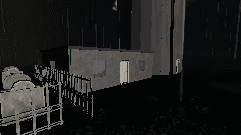
In horror games, the environment is not just a backdrop; it is an active participant in the storytelling. The surroundings set the emotional tone and offer players a window into the narrative. In The Lighthouse Keeper, the Cape Mourn lighthouse serves as both a physical boundary and a metaphorical prison. This dual role heightens the player's sense of isolation and vulnerability.
To craft such environments, developers should focus on meticulous detail. Every object, shadow, and texture contributes to the overall atmosphere. A creaking floorboard or a flickering light can communicate unease more effectively than a direct threat. These elements should be woven into the game's fabric, ensuring that the environment itself tells part of the story.
Visuals and Sound
Visuals and sound are indispensable tools for creating tension and fear. In Unity, developers have a range of options to manipulate these elements. Start by selecting a colour palette that enhances the mood you wish to portray. Dark, muted tones often evoke a sense of dread, while sudden contrasts can shock and unsettle players.
Sound design should not be an afterthought. Layering ambient noises, such as distant thunder or the relentless crash of waves, can immerse players in the world you have built. Silence, too, plays an essential role. It builds anticipation, making the eventual sounds even more jarring. These techniques were integral in crafting the auditory landscape of Cape Mourn in our game.
Strategic Lighting
Lighting is a powerful tool in horror game design. It directs the player's attention, conceals threats, and heightens tension. Unity provides various lighting techniques that can be employed to create an oppressive atmosphere. Dynamic lighting, for instance, can simulate the flicker of a candle or the sweep of a lighthouse beam.
Consider using volumetric lighting to add depth and realism to fog and mist, which are classic horror elements. Shadows should be employed to obscure, suggest, and mislead. Players often fear what they cannot see, and strategic use of shadows can exploit this fear effectively.
Incorporating Narrative Clues
Environmental storytelling is enriched by the subtle placement of narrative clues. In The Lighthouse Keeper, every room and object was designed to hint at the story's deeper mysteries. By gently guiding the player's discovery process, developers can foster a sense of immersion and curiosity.
"The lighthouse stands silent, yet it speaks volumes to those who listen."
Hints and clues need to be seamlessly integrated into the environment. A worn journal on a desk or a series of cryptic notes pinned to a wall can intrigue and unsettle players. These narrative elements should complement, not overshadow, the core gameplay experience.
Utilising Unity Tools
Unity offers a variety of tools that can aid developers in building an oppressive atmosphere. The asset store provides numerous resources for textures, sounds, and environmental effects. Additionally, Unity's lighting and shading options allow for high degrees of customisation, letting developers fine-tune the ambiance.
For those new to Unity, its community forums and tutorials are invaluable. Engaging with fellow developers can inspire creative solutions to common challenges faced in horror game development. Should you have questions or seek further insights, do not hesitate to reach out to us.
Crafting Atmosphere in The Lighthouse Keeper
Every aspect of The Lighthouse Keeper has been meticulously designed to immerse players in its haunting world. From the desolate coastline to the creaking interiors of the lighthouse, each element works in concert to build tension and unease. Our approach to atmosphere is a testament to the power of environmental storytelling within the Unity engine. To explore the eerie world of Cape Mourn further, visit our story page.